Historical Context & Motivation
Modern computing is rarely a solo endeavor, yet the discipline began with individual theorists and engineers building machines in relative isolation. Early pioneers such as Charles Babbage and Ada Lovelace exchanged ideas through letters, but they lacked the formal collaborative structures that define software development today. As software systems grew from a few hundred lines of code to millions, the need for collaboration—the process by which two or more people work together to develop computing innovations—became a non-negotiable part of the creative development process. Understanding why and how collaboration evolved helps explain the AP Computer Science Principles framework's emphasis on it as a foundational practice.
This historical arc reveals a recurring theme: as computing artifacts become more complex, the diversity of skills and perspectives required to build them outstrips any individual's capacity. The central question this lesson addresses is not merely whether collaboration matters, but how effective collaboration practices produce computing innovations that reflect diverse viewpoints and reduce individual bias.
Core Principles of Collaboration
The College Board's AP Computer Science Principles curriculum (Big Idea 1: Creative Development) identifies collaboration as one of its six computational thinking practices. At its core, collaboration in computing means that individuals contribute their unique skills, perspectives, and knowledge to produce an artifact that no single contributor could have created alone. The following principles distill the essential elements of effective collaboration as tested on the AP exam.
Diverse Perspectives
Communication & Consensus
Reduced Bias
Iterative Improvement
Shared Accountability
Visualizing the Collaboration Workflow
Understanding collaboration benefits from seeing how it unfolds in practice. The diagram below illustrates a typical collaborative development cycle in which team members move through phases of planning, developing, reviewing, and integrating. Notice that the process is iterative—teams cycle back through earlier stages as feedback surfaces new requirements or reveals defects. This visual model maps directly to the AP CSP concept that collaboration is an ongoing, non-linear practice.
Each stage in this diagram corresponds to a collaborative practice the AP exam expects you to understand. During the Plan phase, team members discuss requirements and divide responsibilities according to individual strengths. The Develop phase often involves pair programming, where one developer writes code (the "driver") while the other observes and offers feedback (the "navigator"). Review invites peers to examine each other's code for correctness and clarity. Integrate merges individual contributions into a unified product, and Reflect prompts the team to evaluate what worked, what didn't, and what should change in the next iteration.
How Collaboration Works in Practice
Pair Programming
Pair programming is a technique in which two programmers share a single workstation. One assumes the role of the driver, who physically writes the code, while the other serves as the navigator, who reviews each line as it is typed, thinks strategically about the overall approach, and catches errors in real time. The two partners switch roles periodically so that both engage with both the tactical and strategic dimensions of the task. Research consistently shows that pair programming detects defects earlier in the development process and produces code that is easier to maintain, though it requires more total person-hours than solo programming for a given task.
Code Review & Version Control
Even when team members work independently, collaboration still occurs through code review—a process in which one developer examines another's code before it is merged into the shared codebase. Code review surfaces logic errors, inconsistent style, and potential security vulnerabilities that the original author may have overlooked. This practice relies on version control systems (such as Git), which track every change to the project's files, allow multiple contributors to work on different features simultaneously, and enable the team to roll back to a previous state if a change introduces a defect.
Online Collaboration Tools
Collaboration in modern computing extends well beyond face-to-face interaction. Teams use shared documents, project management boards (e.g., Trello, Jira), instant messaging platforms (e.g., Slack, Discord), and video conferencing to coordinate asynchronously across time zones. These tools lower the barrier to entry for collaboration and are particularly relevant to open-source projects where contributors may never meet in person. On the AP exam, you should be prepared to describe how online tools facilitate collaborative development and how they compare to in-person collaboration.
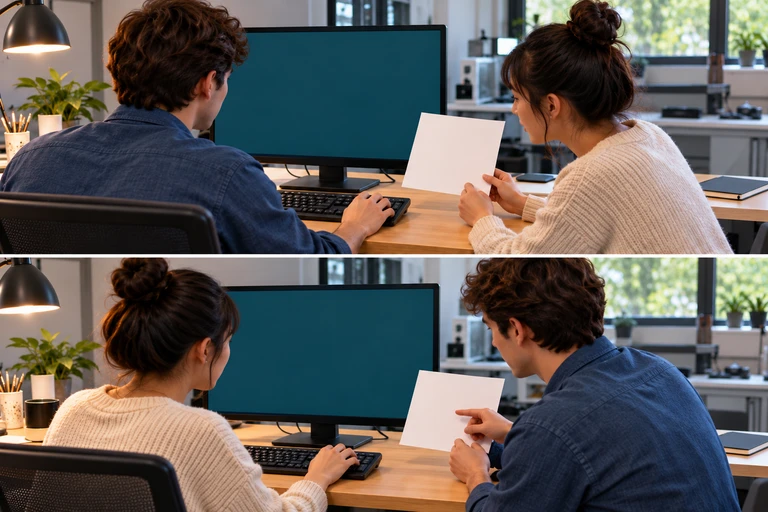 The driver edits the program while the navigator checks its behavior against the intended result. Switching roles lets both collaborators examine the code and its tests.
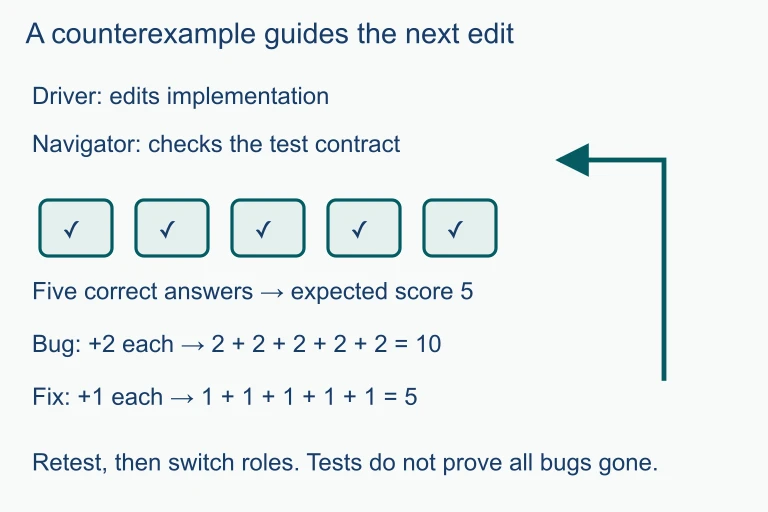 For five correct answers, the expected score is 5. An erroneous increment of 2 produces 10; changing the increment to 1 produces 5 for this test. The navigator checks the contract while the driver makes the edit, then they switch roles.
Models and Methods of Collaboration
Collaboration in computing takes many forms, each with different structures and trade-offs. The diagram below classifies common collaboration models along two axes: the degree of synchrony (real-time versus asynchronous) and the level of coupling (tightly integrated versus loosely coordinated). Understanding where each model falls helps you choose the right approach for a given project and articulate your reasoning on the AP exam.
Each quadrant represents a valid and widely used collaboration style. The AP CSP exam does not require you to memorize specific tool names, but it does expect you to recognize that collaboration can be both synchronous and asynchronous, and that different project needs call for different models. A mobile app startup might rely heavily on real-time pair programming, while a global open-source library thrives on asynchronous pull requests from contributors who have never spoken in person.
Worked Example: Collaboration in a Class Project
Consider a scenario in which three AP CSP students—Amara, Ben, and Clara—are tasked with creating a data visualization app that displays local weather trends. The following worked example traces how they apply collaborative practices from start to finish.
Benefits and Challenges of Collaboration
While the AP exam overwhelmingly frames collaboration as beneficial, it is important to understand both sides. Recognizing common challenges helps you design better collaborative workflows and demonstrates the kind of nuanced thinking the exam rewards.
| Aspect | Benefits | Challenges |
|---|---|---|
| Perspectives | Diverse viewpoints lead to more creative and inclusive solutions | Conflicting visions can slow decision-making if not managed |
| Error Detection | Peer review catches bugs and logic errors early in development | Groupthink can cause the team to overlook shared blind spots |
| Workload | Tasks can be divided according to individual strengths | Unequal contribution ("social loafing") can frustrate members |
| Learning | Team members learn from each other's skills and approaches | Skill gaps may lead to dependency on a single expert |
| Communication | Shared vocabulary and documentation improve project clarity | Miscommunication can introduce integration bugs and delays |
Collaboration and the AP CSP Big Ideas
Collaboration does not exist in a vacuum within the AP CSP framework; it intersects with every Big Idea in the curriculum. The table below maps how collaborative practices connect to other areas you will study, from data and algorithms to the societal impact of computing innovations.
| Big Idea | Connection to Collaboration |
|---|---|
| Big Idea 1: Creative Development | Collaboration is a core computational thinking practice; the Create Performance Task may involve collaborative planning even though the code is individually written. |
| Big Idea 2: Data | Teams collaborate on data collection and cleaning, reducing individual biases in dataset curation and interpretation. |
| Big Idea 3: Algorithms & Programming | Pair programming and code review directly improve algorithm correctness and efficiency. |
| Big Idea 4: Computing Systems & Networks | The Internet itself is a collaborative innovation; version control and cloud-based tools rely on network infrastructure. |
| Big Idea 5: Impact of Computing | Collaborative development with diverse teams helps identify and mitigate harmful societal impacts, such as biased algorithms or inaccessible interfaces. |
Looking forward, the principles of collaboration you learn in AP CSP extend directly into professional software engineering, academic research, and even interdisciplinary fields like computational biology and digital humanities. As computing innovations grow more complex and more consequential, the ability to collaborate effectively across disciplines, cultures, and time zones will only become more critical. The AP exam tests foundational understanding of collaboration's role, but the skill itself is one you will develop and refine throughout your career.
Practice Problems
Summary
Collaboration is the practice of two or more people working together to produce a computing innovation. It incorporates diverse perspectives that help teams reduce bias, improve quality through early error detection, and produce artifacts that exceed the capabilities of any individual developer. Key collaborative techniques include pair programming (driver and navigator sharing a workstation), code review (peers evaluating each other's contributions), and the use of online tools such as version control systems, shared documents, and project management platforms.
The collaborative development cycle—Plan, Develop, Review, Integrate, Reflect—provides an iterative framework for team-based projects. Collaboration models vary along dimensions of synchrony and coupling, from tightly integrated pair programming to loosely coordinated open-source contribution. While collaboration brings challenges such as communication overhead and the risk of groupthink, its benefits—broader creativity, stronger error detection, and more inclusive design—make it indispensable to modern computing and a central topic on the AP CSP exam.